
The best writing software for fiction writers can transform your workflow, but only if you find the right one.
You finally carve out time to start your novel. You sit at your desk, ready to pour words onto the page. But where do you actually start writing? You open Word. Meh. Maybe Google Docs? Too basic. Someone on Twitter swore by Scrivener, but it looks complicated. Before you know it, an hour has passed researching writing software instead of writing your book.
Sound familiar? You’re not alone.
Many fiction writers struggle to pick the best writing tool. They don’t want to waste hours learning something too complex. Self-published authors, especially, need software that helps them stay organized and get their books published faster. The good news? The right program can make writing easier, smoother, and even fun.
What You’ll Learn in This Guide
This post will walk you through the five best writing software programs for fiction writers. You’ll discover:
- Which tool matches your writing style (Are you a plotter or pantser?)
- Pros, cons, pricing, and which ones offer free trials
- Which software keeps you organized, focused, and on track for publishing
Ready to Find Your Perfect Writing Software?
By the end of this guide, you’ll know exactly which tool fits YOU best—so you can stop stressing and start writing.
Still unsure which writing software fits your needs? Reach out to me for expert guidance. I’d love to help you find the perfect tool for your writing style! Contact Me Here
Related Reading: 6 Author Platform Mistakes that are Costing You Readers
Avoid common mistakes that could be holding back your growth as a writer and making it harder to build an audience.
This post contains affiliate links, meaning I may earn a commission if you make a purchase through them, at no extra cost to you. Your support helps keep this blog running, thank you!
How to Choose the Right Writing Software (Are You a Plotter or Pantser?)
Before picking the best writing software for fiction writers, let’s figure out your writing style. Do you crave structure, or do you dive in without a plan? Knowing this will help you choose the tool that fits your process.
What Kind of Writer Are You?
| Writing Style | Best Software Match |
| I love planning everything in advance. I need structure! | Scrivener or Dabble |
| I write by the seat of my pants. I hate too many tools! | Ulysses or Dabble |
| I need help making my writing clear and concise. | Hemingway Editor |
| I’m getting ready to publish my book. I need formatting help! | Vellum |
If you outline every chapter before writing, you need a tool that keeps everything in one place. Scrivener and Dabble offer storyboarding, scene management, and note organization.
If planning feels restrictive, you need something simple and distraction-free. Ulysses and Dabble let you write freely without extra features getting in the way.
If you struggle with readability, Hemingway Editor makes editing easier by highlighting passive voice and complex sentences.
If you’re publishing soon, Vellum helps format your book for Kindle, EPUB, and print, without any tech headaches.
Now, Let’s Dive Into the Best Tools for Fiction Writers!
Now that you know your writing style, it’s time to explore the five best writing software programs for fiction writers. Each one has unique features that can help you write, edit, and publish with confidence.
Not sure where to start? Let’s talk! Schedule a free consultation, and I’ll help you choose the best writing software to streamline your process. Book a Call
Related Reading: 18 Must-Have Author Platform Tools to Simplify Your Writing Life
Discover additional tools that can help streamline your writing process, from outlining to editing and publishing.

Scrivener – The Best Writing Software for Novelists
Scrivener stands out as a premier writing software for fiction writers, offering an extensive array of tools tailored to the needs of novelists. Its design caters to both the creative and organizational aspects of writing, making it a favorite among authors.
Why Writers Love Scrivener
- Robust Organizational Features: Scrivener’s virtual corkboard and binder system allow writers to arrange and rearrange scenes and chapters effortlessly, providing a clear visual structure to their manuscripts.
- Integrated Writing and Research Environment: The split-screen mode enables simultaneous viewing of writing and research materials, eliminating the need to switch between different applications.
- Customizable Formatting and Export Options: Writers can tailor the writing environment to their preferences and export their work into various formats, including ePub, PDF, and Word, facilitating seamless transitions to publishing platforms.
Pros and Cons of Scrivener
Pros:
- Ideal for Detailed Planning: Scrivener’s tools support meticulous outlining and structuring, benefiting writers who prefer comprehensive planning.
- Suitable for Lengthy Projects: Designed to handle large manuscripts, Scrivener ensures smooth performance even with extensive content.
- Cross-Platform Availability: Accessible on macOS, Windows, and iOS, Scrivener allows writers to work across different devices.
Cons:
- Steep Learning Curve: The multitude of features may require a significant time investment to master, potentially posing challenges for new users.
- Manual Cloud Syncing: Absence of an integrated cloud service necessitates the use of third-party solutions like Dropbox for syncing projects across devices.
Pricing and Free Trial
- macOS and Windows: $59.99 for a standard license.
- iOS: $23.99, available through the App Store.
- Educational Discounts: Available for students and academics, reducing the price to $41.65.
- Free Trial: A 30-day trial period, counting only active usage days, allows writers to explore Scrivener’s capabilities before purchasing.
Scrivener offers a comprehensive solution for fiction writers seeking a versatile and powerful writing tool. Its rich feature set supports the entire writing process, from initial brainstorming to final manuscript preparation. While it may require an initial investment of time to fully harness its capabilities, many writers find that Scrivener significantly enhances their productivity and organization.
Related Reading: 2025 Author Platform Goals: How to Set Achievable Goals and Grow Your Audience
Having the right tools is just one part of the equation. Learn how to set strategic goals to build your author platform and reach more readers.
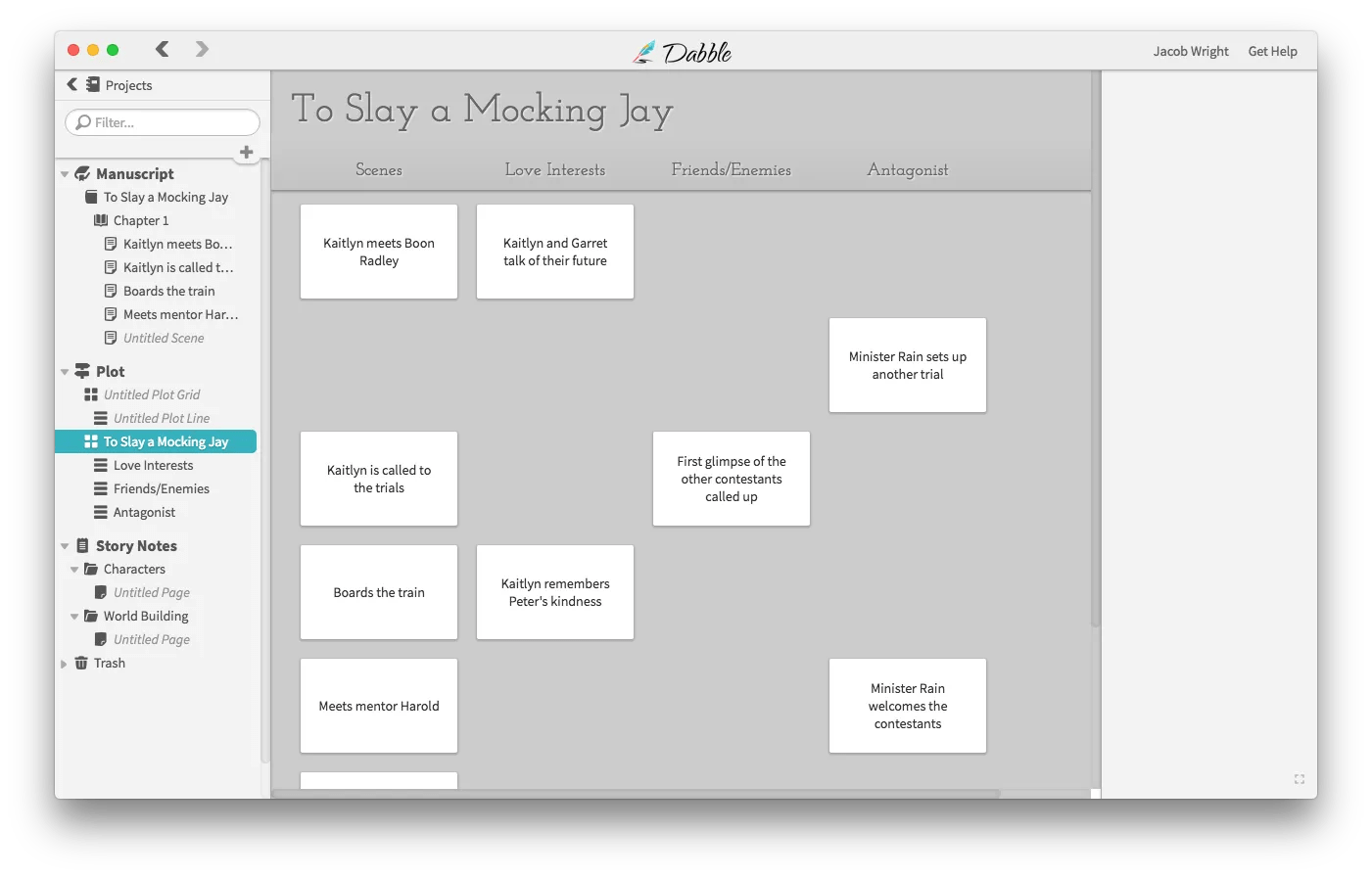
Dabble – Best for Cloud-Based Writing and Minimalist Writers
Dabble is a cloud-based writing software designed for novelists seeking a streamlined and intuitive writing experience. Its minimalist interface and robust features cater to writers who prefer simplicity without sacrificing functionality.
Why Writers Love Dabble
- Simple, Distraction-Free Interface: Dabble offers a clean and uncluttered workspace, allowing writers to focus solely on their manuscripts without unnecessary distractions.
- Auto-Sync Across Devices: As a cloud-based platform, Dabble automatically syncs your work across multiple devices, enabling you to write from anywhere with an internet connection.
- Built-In Story Plotting Tools: With features like the Plot Grid and Story Notes, Dabble assists writers in organizing their narratives, characters, and settings effectively.
Pros and Cons of Dabble
Pros:
- Ideal for Minimalists: Dabble’s straightforward design is perfect for writers who prefer a no-frills writing environment.
- Cloud-Based Accessibility: Access your projects from any device without the need for installations or manual backups.
- No Software Downloads Required: Operate entirely within your web browser, eliminating compatibility issues and setup time.
Cons:
- Subscription-Based Pricing: Unlike one-time purchase software, Dabble operates on a monthly or annual subscription model.
- Limited Customization Compared to Scrivener: While Dabble offers essential features, it lacks the extensive customization options found in more complex tools like Scrivener.
Pricing and Free Trial
Dabble offers three subscription tiers to accommodate different writing needs:
- Basic: $14 per month, including unlimited manuscripts, cloud backup and sync, access on any device, goals and stats, manuscript organization, spell check, dark mode, and email support.
- Standard: $19 per month, encompassing all Basic features plus the Plot Grid, Story Notes, Focus Mode, text highlighting, sticky notes, and comments.
- Premium: $29 per month, offering all Standard features along with advanced grammar and style checks, an in-context thesaurus, Read-to-Me functionality, co-authoring capabilities, priority support via chat and email, and access to premium courses and workshops.
A 14-day free trial is available, allowing writers to explore all features without requiring credit card information.
Best For
Dabble is ideal for writers who value simplicity and the convenience of cloud syncing. Its user-friendly interface and essential writing tools make it particularly suitable for minimalist writers and those who prefer writing across multiple devices without hassle.
Want a minimalist approach to writing while staying organized? Let’s work together to build a simple, effective writing workflow that keeps you on track! Explore My Coaching Packages

Hemingway Editor – Best for Improving Readability and Clarity
Hemingway Editor is a writing tool designed to enhance the clarity and readability of your prose. By highlighting complex sentences and common errors, it assists writers in crafting concise and impactful content.
Why Writers Love Hemingway Editor
- Color-Coded Readability Feedback: The editor uses a color-coded system to identify hard-to-read sentences, passive voice, adverbs, and complex phrases, making it easy to spot areas for improvement.
- Eliminates Passive Voice and Adverbs: By highlighting passive constructions and excessive adverb usage, Hemingway encourages more active and direct writing.
- One-Time Purchase: The desktop version is available for a one-time payment, offering a cost-effective solution without recurring fees.
Pros and Cons of Hemingway Editor
Pros:
- User-Friendly Interface: Simply paste your text into the editor to receive immediate feedback, streamlining the self-editing process.
- Free Web Version: Access basic features online without any cost, allowing users to experience the tool before committing to the desktop app.
Cons:
- Limited Spellcheck and Grammar Tools: Hemingway focuses on style and readability but does not offer comprehensive spellchecking or advanced grammar correction.
- Not a Writing Organization Tool: Unlike some writing software, Hemingway does not provide features for organizing or managing larger writing projects.
Pricing and Free Trial
- Desktop Version: Available for a one-time purchase of $19.99, compatible with both Mac and Windows operating systems.
- Free Web Version: Offers basic editing features accessible through standard web browsers without any cost.
Best For
Hemingway Editor is ideal for writers aiming to produce clearer and more concise prose. It’s particularly useful for self-editing shorter pieces, such as articles and essays, where readability is paramount.

Ulysses – Best for Mac and iOS Writers Who Love Simplicity
Ulysses is a writing application designed exclusively for Apple devices, offering a minimalist and distraction-free environment that caters to writers seeking a clean and focused workspace. Its seamless integration across macOS, iPadOS, and iOS makes it a preferred choice for those entrenched in the Apple ecosystem.
Why Writers Love Ulysses
- Minimalist, Distraction-Free Writing Space: Ulysses provides a clean interface that allows writers to concentrate solely on their content, free from unnecessary clutter.
- Markdown Formatting for Quick Exports: Utilizing Markdown, Ulysses enables swift formatting and exporting of documents into various formats, including PDF, DOCX, and HTML.
- Syncs Across Mac, iPad, and iPhone: With full iCloud synchronization, Ulysses ensures that your writing is consistently updated and accessible across all your Apple devices.
Pros and Cons of Ulysses
Pros:
- Seamless Integration with Apple Devices: Ulysses is tailored specifically for the Apple ecosystem, providing a consistent and optimized experience across macOS, iPadOS, and iOS.
- Comprehensive Organizational Tools: The app offers features such as a library for managing projects, keyword tagging, and advanced search functions, aiding writers in maintaining structure and efficiency.
- Direct Publishing Capabilities: Ulysses supports direct publishing to platforms like WordPress, Ghost, Medium, and Micro blog, streamlining the process for bloggers and content creators.
Cons:
- Subscription-Based Pricing: Ulysses operates on a subscription model, which may be a deterrent for writers preferring one-time purchases.
- Limited to Apple Platforms: The app’s exclusivity to Apple devices restricts its accessibility for writers using other operating systems.
Pricing and Free Trial
- Standard Subscription: Ulysses offers a subscription at $5.99 per month or $39.99 per year, providing full access across all your Macs, iPads, and iPhones, along with seamless iCloud synchronization.
- Student Subscription: Eligible students can avail of a discounted rate of $10.99 for six months, making it a cost-effective option for academic writing.
- Free Trial: A fully functional seven-day free trial is available, allowing writers to explore Ulysses’ features before committing to a subscription.
Best For
Ulysses is ideal for writers who are deeply integrated into the Apple ecosystem and appreciate a minimalist, distraction-free writing environment. Its robust organizational tools and Markdown support make it particularly suitable for authors, bloggers, and content creators seeking a seamless writing and publishing workflow.

Vellum – Best for Formatting Self-Published Books
Vellum is a specialized book formatting software that simplifies the process of creating professional-quality eBooks and print books. Its intuitive interface and robust features make it a popular choice among self-published authors aiming for polished and aesthetically pleasing publications.
Why Writers Love Vellum
- Professional Book Formatting Made Easy: Vellum offers a user-friendly platform that enables authors to format their manuscripts effortlessly, resulting in professional-grade layouts without the need for extensive technical knowledge.
- Exports to Kindle, EPUB, and Print-Ready PDFs: The software supports multiple output formats, including Kindle, EPUB, and print-ready PDFs, ensuring compatibility with various publishing platforms and devices.
- Live Preview Mode to See Changes in Real-Time: Vellum’s live preview feature allows authors to instantly visualize how their formatting adjustments will appear across different devices and formats, streamlining the editing process.
Pros and Cons of Vellum
Pros:
- User-Friendly Interface: Vellum’s intuitive design makes it accessible for authors without prior formatting experience, reducing the learning curve associated with book design.
- Customizable Styles and Layouts: The software provides a variety of pre-designed styles and layout options, allowing authors to tailor the appearance of their books to align with their vision.
- Efficient Workflow: With features like automatic chapter detection and synchronized formatting across eBook and print versions, Vellum enhances the efficiency of the publishing process.
Cons:
- Mac-Only Availability: Vellum is exclusively available for macOS, limiting accessibility for authors using other operating systems. vellum.pub
- Higher Price Point: The software’s cost may be a consideration for authors, particularly those planning to publish a single book.
Pricing
- Vellum Ebooks: Priced at $199.99, this option allows for the creation of unlimited eBooks.
- Vellum Press: For $249.99, authors can create unlimited eBooks and print books, offering a comprehensive solution for both digital and physical publishing needs.
Best For
Vellum is best suited for self-published authors who prioritize high-quality book formatting and seek a straightforward, efficient tool to achieve professional results. Its features cater to those aiming to produce visually appealing books without delving into complex design processes.
Formatting your book is just one step. Are you ready for a successful launch? Let’s craft a winning book marketing strategy that gets your book in front of readers! Work With Me
Related Reading: How to Build an Author Website that Attracts Readers & Sells More Books
Once your book is formatted, you need a great website to showcase it. Learn how to build an author website that helps you sell more books.
Which Writing Software is Right for You?
Choosing the right writing software can significantly enhance your writing experience. Here’s a quick recap to help you decide:
| Software | Best For | Pricing |
| Scrivener | Plotters, Detailed Outlining | $59.99 one-time |
| Dabble | Minimalists, cloud-based writers | $9-$29 per month |
| Hemingway Editor | Self-editing & readability | $19.99 one-time |
| Ulysses | Mac users who love simplicity | $5.99 per month |
| Vellum | Formatting for self-publishing | $199.99+ one-time |
Note: Prices are accurate as of March 5, 2025, but may vary.
Consider your writing style, platform preference, and budget when selecting the software that best fits your needs.
The right tools can make all the difference in your writing journey. Let’s build your author platform together so you can focus on what matters, writing your book! Schedule Your Free Consultation Today
Take Your Writing to the Next Level with the Right Tools
Choosing the best writing software is just the first step. To truly build your author platform, grow your audience, and get your book in front of the right readers, you need a strategy that works. That’s where my Author Platform Jumpstart Package comes in.
With the Author Platform Jumpstart Package, You Will:
- Clarify Your Author Brand – Define your niche, message, and target audience.
- Optimize Your Online Presence – Get expert guidance on setting up your website, social media, and email list.
- Develop a Strategic Content Plan – Learn how to use your blog, social media, and email marketing to connect with readers.
- Master Book Marketing Basics – Discover how to leverage writing tools, publishing platforms, and reader engagement strategies to sell more books.
Stop second-guessing your next steps. Let’s build an author platform that supports your writing career.
Ready to Jumpstart Your Author Platform?

Let’s Chat!
Which writing software do you use, and why does it work for you? Do you love Scrivener’s organization, Dabble’s simplicity, or Ulysses’ clean interface? Maybe you have a hidden gem that more writers should know about!
Share your thoughts in the comments. I’d love to hear what works for you and why!

Leave a Reply